
Speed to Lead: How AI Voice and Chat Agents Cut Response Time From Hours to Seconds
 Hamza Imran··21 min read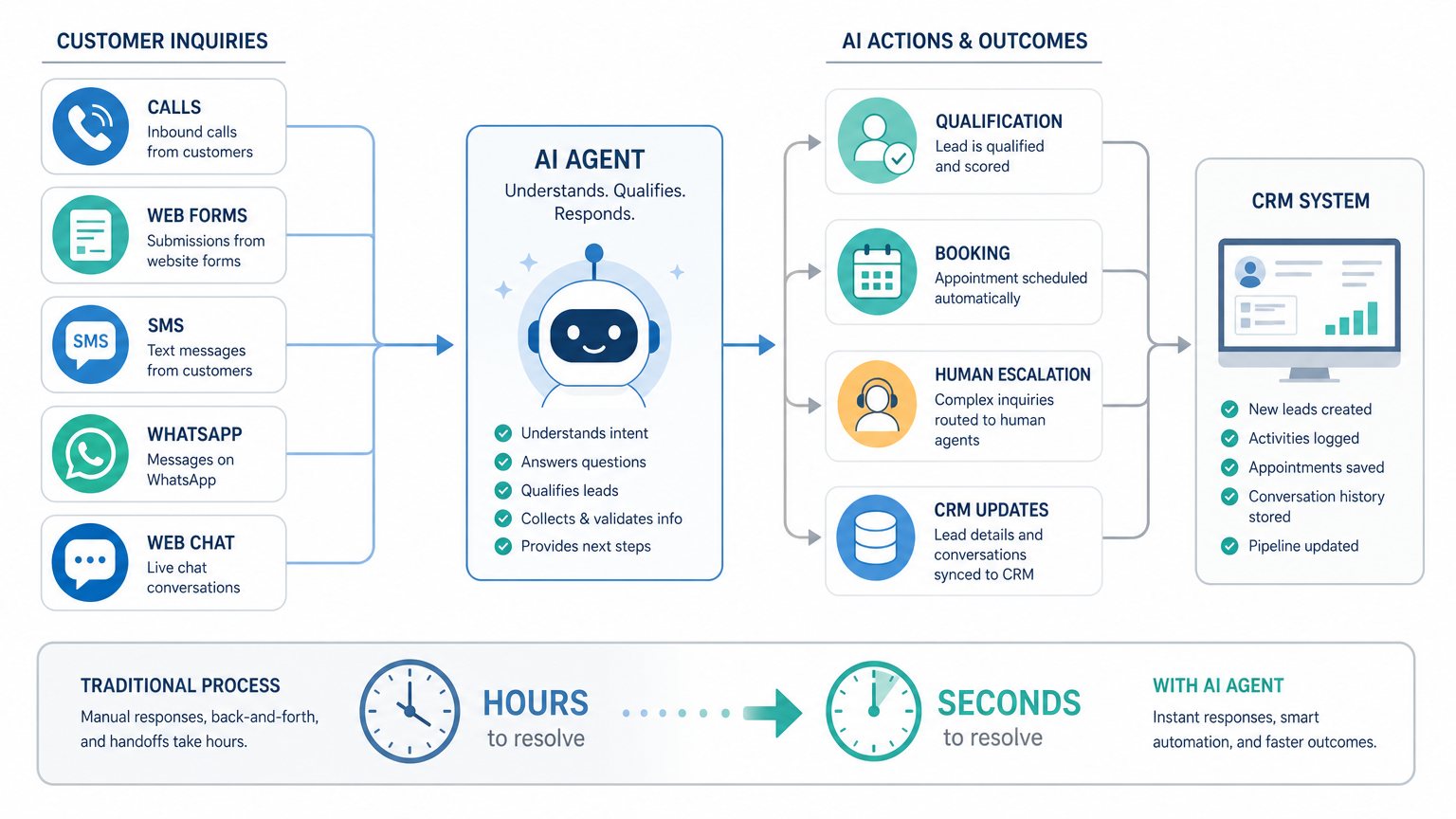
A customer calls while your receptionist is helping someone else. Another submits a website form at 8:47 p.m. A third sends a WhatsApp message asking whether you serve their postcode. By the time your team works through those enquiries the next morning, one customer has already booked with a competitor and another no longer answers the phone.
The problem is not necessarily poor service or an unmotivated team. It is that human availability rarely matches the moment when a prospective customer is ready to act. Calls arrive together, website forms sit in an inbox, and messages are divided among personal phones, shared accounts, and disconnected systems.
An AI voice or chat agent changes that operating model. It can respond within seconds, gather the information needed to qualify the enquiry, offer a suitable appointment, and update your existing CRM. Your employees remain responsible for exceptions and valuable conversations, but they no longer have to manually acknowledge and sort every lead before anything happens.
What Speed to Lead Actually Means
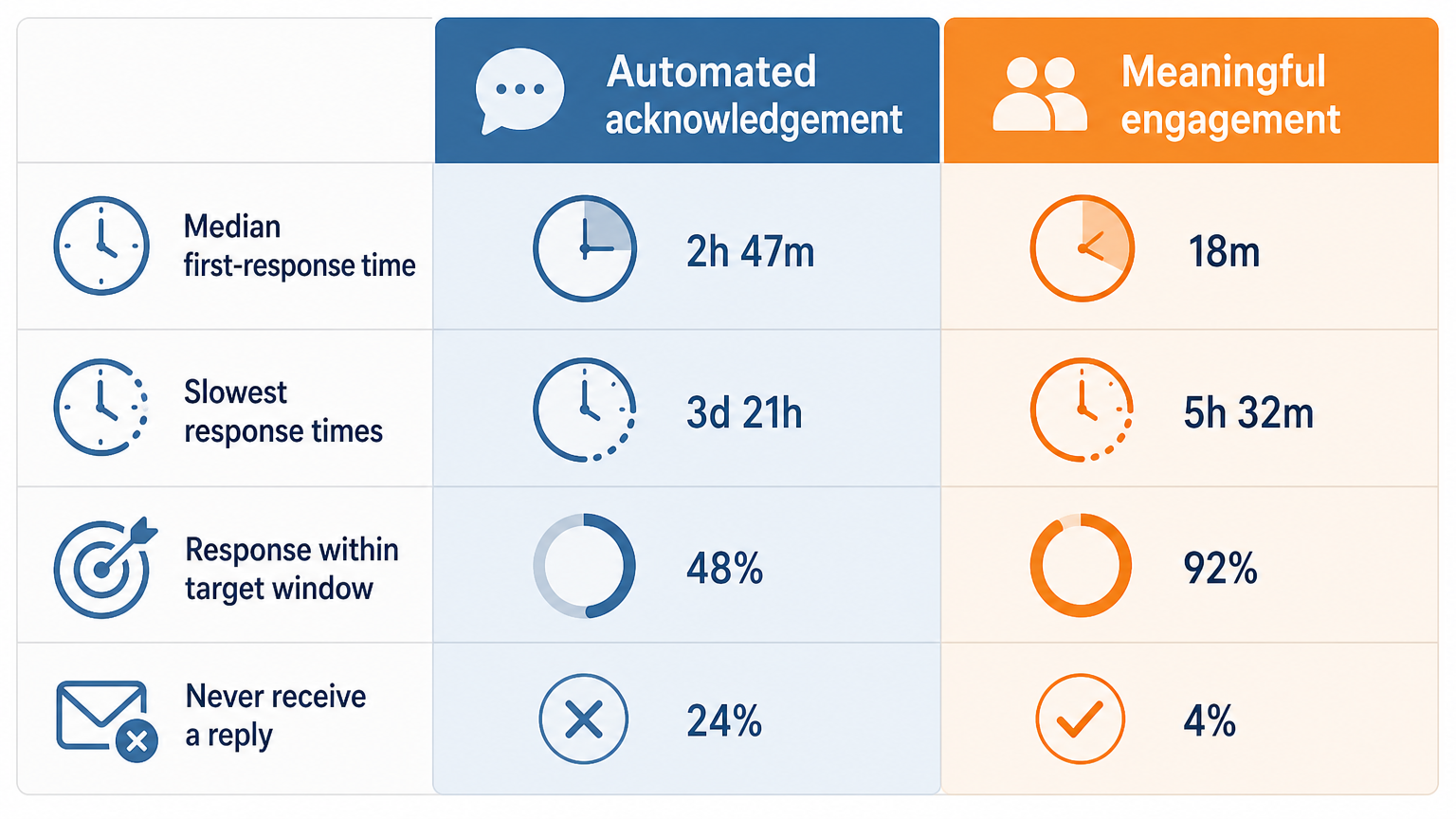 Speed to lead is the time between a prospective customer making contact and receiving a meaningful response from your business. The clock might begin when someone submits a form, calls your number, starts a web chat, or sends an SMS or WhatsApp message. It stops only when the person receives useful engagement, not when an automated email says, “We have received your message.”
That distinction matters. A generic acknowledgement confirms that a form worked, but it does not answer whether you cover the customer’s location, have availability on Tuesday, accept their insurance, or can repair their particular equipment. A meaningful first response moves the enquiry to its next step by answering a question, collecting relevant details, or making an appointment possible.
Speed also needs to be measured by channel and time of day. Looking at an average across all enquiries can conceal serious gaps. If calls receive fast attention during office hours but Friday-evening web leads wait until Monday morning, the overall average may look reasonable while a valuable group of prospects consistently receives slow service.
A five-minute response is not a universal law or a guaranteed conversion threshold. Its practical value comes from what is happening during those minutes. The prospect still has the problem in front of them, remembers the details they entered, and may still be holding their phone. They may also be contacting several providers in sequence, especially for urgent services such as plumbing, dental care, property repairs, transport, or home healthcare.
Consider a homeowner who discovers a leaking pipe at 7:30 p.m. They call three local companies and submit two web forms. If your company answers at 9:00 the next morning, your team may provide excellent service, but the immediate buying decision has probably already been made. The first provider that confirmed coverage, asked about the severity of the leak, and offered a service window removed the customer’s reason to keep searching.
This is why speed to lead should be treated as an operational metric rather than just a sales slogan. Measure the median first-response time, the slowest response times, the percentage of leads receiving a response within your target window, and the number that never receive a reply. You should also separate automated acknowledgement from meaningful engagement so that a fast but unhelpful email does not make the process look healthier than it is.
Why Human-Only Follow-Up Breaks Down
Most small businesses do not intentionally leave leads waiting. Delays emerge because the same people responsible for answering enquiries are also serving customers, coordinating schedules, preparing quotes, handling cancellations, and resolving problems. Hiring another administrator can increase capacity, but it does not automatically provide continuous coverage or combine fragmented channels.
The weakness is structural. Incoming demand is irregular, while employee capacity is fixed by shifts and simultaneous workload. A team may have enough capacity across an entire day yet still fail during a 30-minute rush or outside its normal opening hours.
After-hours leads wait while intent fades
A form submitted at 10:00 p.m. may not be handled until someone opens the shared inbox the next morning. Weekend enquiries can wait much longer. Even if the prospect’s need is not urgent, they may use that waiting period to compare alternatives, ask friends for recommendations, or book through a provider offering immediate scheduling.
Extending employee coverage is possible, but it creates a staffing decision. You must either pay for evening and weekend shifts, use an answering service, or ask existing employees to monitor devices outside working hours. That can be expensive, inconsistent, and difficult to sustain when after-hours lead volume fluctuates.
An AI agent provides first-line coverage without pretending every issue can be resolved automatically. It can establish what the person needs, check whether the request falls within your service area, and offer the next available appointment. If the enquiry requires a specialist, the agent can set expectations and create a follow-up task for the appropriate employee rather than letting the message remain unseen.
Peak volume creates queues
Human-only processes also fail during ordinary working hours. A dental reception team may receive several calls while checking in patients. A garage can have technicians, suppliers, and customers calling at the same time. A cleaning company may see a surge of quote requests after a local advertising campaign launches.
The issue is concurrency. One employee can generally conduct one phone conversation at a time, while several customers can call or submit forms simultaneously. Voicemail prevents the calls from disappearing completely, but it transfers the workload into a callback queue and asks each caller to wait without knowing when they will hear back.
AI voice and messaging systems can handle multiple initial conversations at once, subject to the capacity and rate limits of the underlying telephony, messaging, and AI services. They can collect consistent information from every prospect instead of forcing an employee to choose which ringing line or inbox to handle first. Human attention can then be prioritized according to urgency, value, location, or the skills required.
Multiple channels hide ownership gaps
A lead process becomes harder to manage when calls go to a phone system, forms generate email, SMS lands on a shared mobile, and WhatsApp is monitored by whoever happens to be logged in. Each channel may work independently, but no one has a complete view of the conversation. Two employees might contact the same lead, while another enquiry receives no response because each person assumes somebody else owns it.
Channel switching creates another problem. A customer may call first, submit a form after reaching voicemail, and then reply to an automated text. If these events are treated as three separate leads, your CRM becomes cluttered and the customer has to repeat information.
A properly designed agent uses identifiers such as phone number, email address, and CRM contact ID to connect related interactions. It should add messages and call outcomes to one contact record where confidence is high, while flagging uncertain matches for review. The goal is not merely to automate four channels independently. It is to create one coordinated intake process across them.
How an AI Agent Closes the Gap
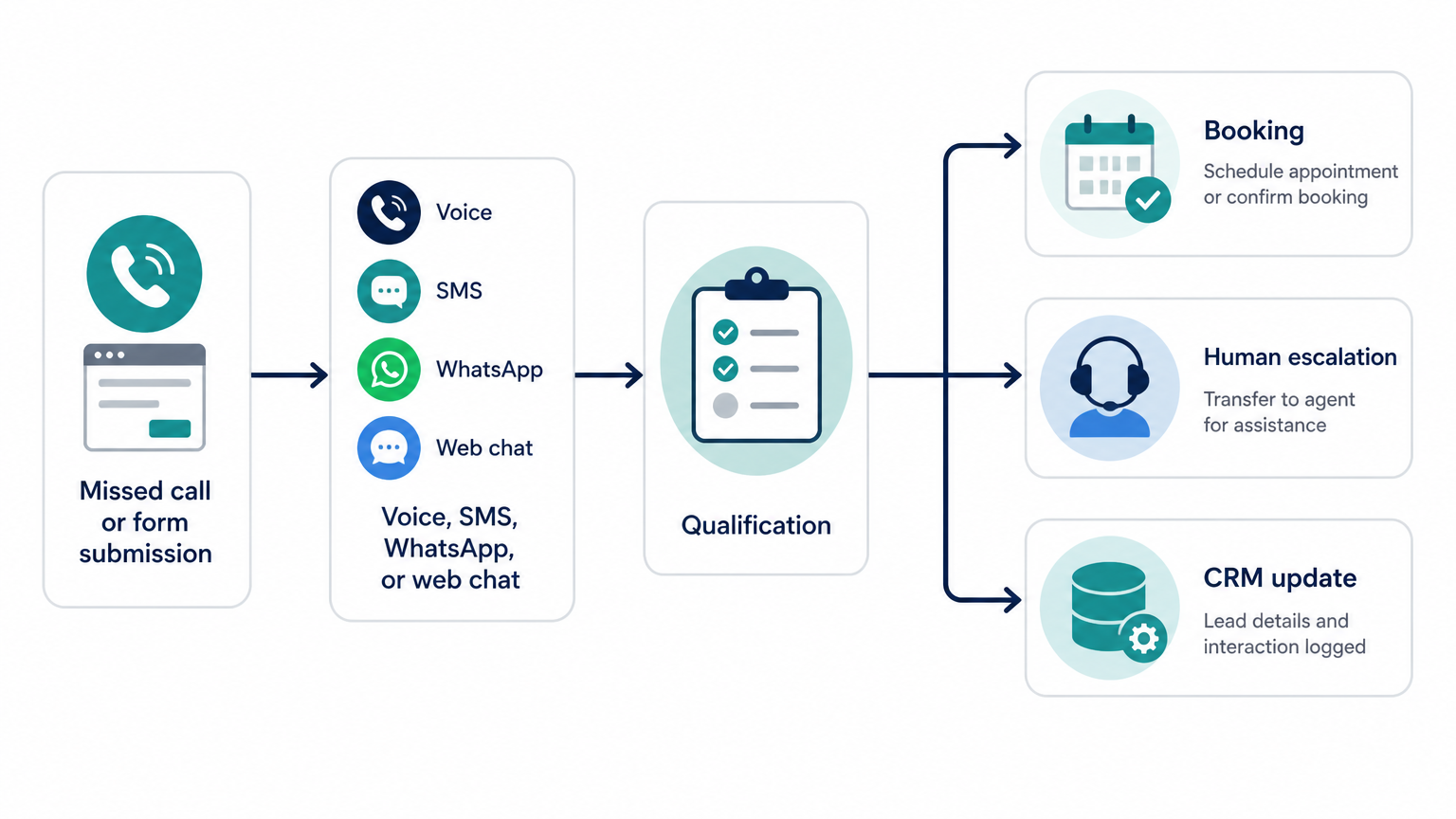 An effective AI agent sits between your communication channels and existing business systems. It receives an event, such as a missed call or form submission, identifies the appropriate workflow, and begins a conversation through voice, SMS, WhatsApp, or web chat. Behind that conversation, deterministic business rules control what the agent may offer, which data it must collect, and when a person needs to take over.
This is more than adding a general-purpose chatbot to a website. The valuable part is the orchestration connecting telephony, messaging, calendars, CRM records, service-area rules, and human escalation. The agent’s language model can interpret natural responses, but it should not invent prices, appointment availability, or company policies.
Instant first response, 24 hours a day
For a missed call, the workflow can send a text within seconds: “Sorry we missed your call. Are you looking to book a repair, discuss an existing appointment, or speak with our team about something else?” That is more useful than directing every caller to voicemail because it offers an immediate route forward. It also lets someone respond discreetly if they cannot take a return call.
Web leads can enter a similar flow as soon as the form is validated. The agent might contact the prospect through the communication method they selected, state the business name clearly, and reference the service requested. If the person does not respond, follow-up rules can schedule a limited number of reminders while respecting opt-outs and local communication requirements.
Round-the-clock response should not mean round-the-clock sales pressure. Messages sent late at night may need to be concise, and outbound voice calls should follow applicable calling rules and customer consent. The system should distinguish a customer initiating a live conversation from the business starting a new promotional campaign.
Qualification happens before an employee is interrupted
A useful agent asks only the questions needed to determine the next action. For a local heating company, that might include the property postcode, boiler type, problem category, urgency, and whether the caller is an owner or tenant. For a clinic, the questions will be different and may involve sensitive health information, so privacy controls and the limits of automation become substantially more important.
The sequence should adapt to the response rather than presenting a long questionnaire. If a postcode falls outside the service area, there is little value in asking eight more questions. If the customer reports a possible gas leak, the workflow should stop routine booking and present approved emergency instructions rather than improvising troubleshooting advice.
Qualification does not have to mean rejecting leads. It can route them. A commercial enquiry may go to an account manager, an existing customer may go to support, and a simple residential job may proceed to self-booking. Employees receive a concise summary containing the original request, answers collected, urgency, and any points of uncertainty.
Booking and routing remove another delay
Responding quickly but asking someone to wait for a scheduling call still leaves friction in the process. When the job type and business rules allow it, the agent can read current availability from a scheduling system and offer two or three valid options. Once the customer chooses, it creates the appointment, sends confirmation, and records the outcome in the CRM.
Calendar access requires stronger controls than simply allowing the AI to write arbitrary events. The system should enforce service duration, travel buffers, technician skills, opening hours, location, and lead time through application logic. The language model can understand that “sometime after school pickup” means a later slot, but the scheduling service should decide which actual times are valid.
Not every lead should book automatically. High-value commercial work may require an estimator, while a healthcare request may need clinical triage or identity verification. In those cases, the agent can reserve a callback window, route the summary to the right queue, and tell the customer exactly what will happen next.
A Worked Example: Missed Calls and Web Leads for a Local Service Business
 Imagine a local plumbing and heating company with six field technicians and two office employees. The company already has a website form, a cloud phone number, a shared inbox, a job calendar, and a basic CRM. Its problem is not a lack of software. The problem is that those tools do not coordinate the first few minutes after an enquiry arrives.
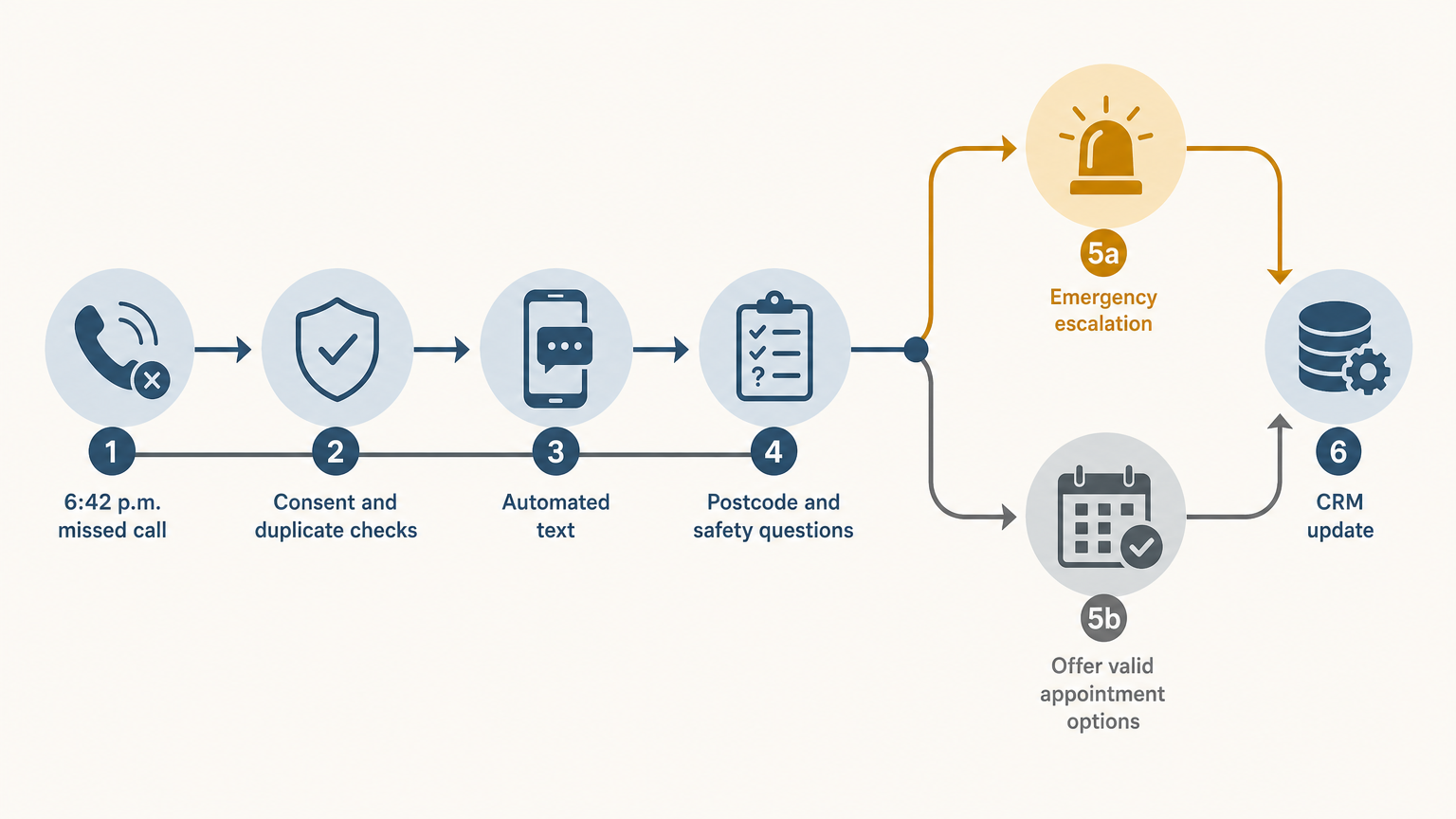
At 6:42 p.m., a homeowner calls while the office is closed. The phone platform records a missed-call event and passes the caller’s number to the intake application. Before sending anything, the application checks whether the number belongs to an existing customer, whether the person has opted out of messages, and whether another conversation has already started.
The customer then receives a branded text: “Thanks for calling Northside Heating. Our office team is unavailable, but I can help with a new booking or take details for a callback. Is this about heating, plumbing, or an existing job?” The wording makes it clear that the person is interacting with an automated service and avoids implying that an employee is currently typing.
Suppose the customer replies, “Boiler is making a loud noise and there is no hot water.” The agent identifies the likely service category, but it does not diagnose the boiler. It asks for the postcode, whether there is a smell of gas, and whether water is leaking. These questions come from an approved workflow, not from the model inventing its own safety checklist.
If the customer reports a gas smell, routine automation stops. The agent displays the company’s approved emergency message and marks the case for immediate human escalation according to the company’s policy. It does not book a standard repair slot or attempt to reassure the customer that the situation is safe.
If there is no emergency indicator and the postcode is covered, the scheduling service checks technician availability. It may offer “tomorrow between 10:00 and 12:00” or “Thursday between 8:00 and 10:00,” based on the job duration and technician skills stored in the scheduling system. When the customer selects Thursday, the application temporarily holds the slot, confirms contact and address details, and then creates the job.
The CRM receives a structured update containing the lead source, missed-call timestamp, conversation transcript, service category, qualification answers, booked time, and automation status. The office team sees the appointment the next morning without re-entering the information. The assigned technician receives only the job details relevant to carrying out the visit.
Now consider a second prospect who submits the website form at the same time. They request a bathroom renovation quote but omit their phone number. The agent can reply by email, ask for the property postcode and preferred consultation method, and create a CRM task once those details arrive. It should not hold a technician repair slot because renovation estimates follow a different sales process.
A third person calls twice, submits a form, and responds to the first missed-call text. The integration uses the matching phone number to associate these events with one conversation. It adds the form details to the existing record rather than creating three opportunities, while preserving each source event for audit and reporting.
This worked example shows where custom AI earns its place. The conversational layer handles varied language, but ordinary software controls safety branches, consent checks, duplicate detection, calendar writes, and CRM updates. If the AI service is temporarily unavailable, the business can fall back to a simple message and callback task instead of losing the lead entirely.
What to Look for When Building This
Enterprise speed-to-lead platforms often assume that a business already has a mature sales stack, dedicated administrators, territory rules, and a large team of sales representatives. A local service business may need something narrower: respond to missed calls, qualify five or six job categories, book against a real calendar, and keep the existing CRM accurate.
That narrower scope can still require careful engineering. A polished conversation is only one part of the system. You also need channel integrations, permission controls, monitoring, retry logic, duplicate prevention, audit history, and a clear operational owner.
Keep a human in the loop for defined edge cases
“Human in the loop” should mean more than placing a phone number at the bottom of a chatbot. Define the situations that trigger handoff before launch. Typical triggers include safety concerns, complaints, refund requests, uncertain intent, repeated misunderstanding, vulnerable customers, unusually valuable enquiries, and any request the system is not authorized to complete.
The handoff must preserve context. An employee should receive the transcript, contact details, answers already collected, and an explanation of why automation stopped. Asking the customer to repeat everything weakens the benefit of the fast initial response and makes the automation feel like an obstacle.
You also need to define what happens when no human is currently available. The agent can offer a callback window, create a priority task, and tell the customer when the team will respond. It should never claim that someone will call “shortly” unless the workflow can support that promise.
Review is equally important after deployment. Examine failed conversations, abandoned bookings, incorrect classifications, and frequent escalation reasons. If customers regularly ask a question the agent cannot answer, decide whether to add an approved response, integrate another source of data, or intentionally preserve human handling.
Integrate with the CRM you already use
Replacing your CRM can turn a targeted response-time project into a risky business transformation. If your team already works in HubSpot, Salesforce, Zoho CRM, Jobber, ServiceTitan, or another operational platform, the AI agent should generally read and write through supported APIs rather than create a parallel customer database.
Start by deciding which system owns each piece of information. The CRM might own contact records and pipeline status, while the scheduling platform owns appointment availability. The AI conversation store can retain message history, but the CRM should receive the summary and outcome your employees need for daily work.
Writes must be safe to retry. If the CRM API times out after creating a contact, the integration should not create a duplicate when it tries again. Idempotency keys, event IDs, timestamps, and reconciliation jobs are less visible than the AI conversation, but they are essential to dependable operation.
Field mapping also needs business input. “Qualified” might mean postcode verified and service selected for one company, while another requires budget, property type, and decision-maker status. Do not let the technical team infer these definitions from old CRM fields without confirming how employees actually use them.
Design privacy, consent, and data retention into the workflow
A local service lead may provide an address, access instructions, payment context, or details about a vulnerable resident. Healthcare and digital health teams can receive protected or sensitive information through the same conversational interfaces. The architecture should collect only what the workflow needs and limit which employees, vendors, and models can access it.
For health-related use cases, calling a product “HIPAA-ready” or “GDPR-ready” is not enough. The obligations and system design differ based on role, jurisdiction, processing purpose, vendor contracts, retention policies, and the data involved. Teams operating across the US and EU should understand the architectural implications of how HIPAA and GDPR differ before sending patient conversations to an AI provider.
Consent records and opt-outs must also move across channels. If a person replies “STOP” to an SMS, the application should update the appropriate messaging status and prevent an automated follow-up sequence from restarting the conversation. Recording voice calls, sending WhatsApp templates, and using customer data for marketing can introduce additional requirements depending on location and purpose.
Set retention rules deliberately. You may need the CRM summary longer than the full audio recording or model prompt. Separating operational records from raw conversational data makes deletion, access control, and audit requests easier to manage.
Test failure modes, not just the happy path
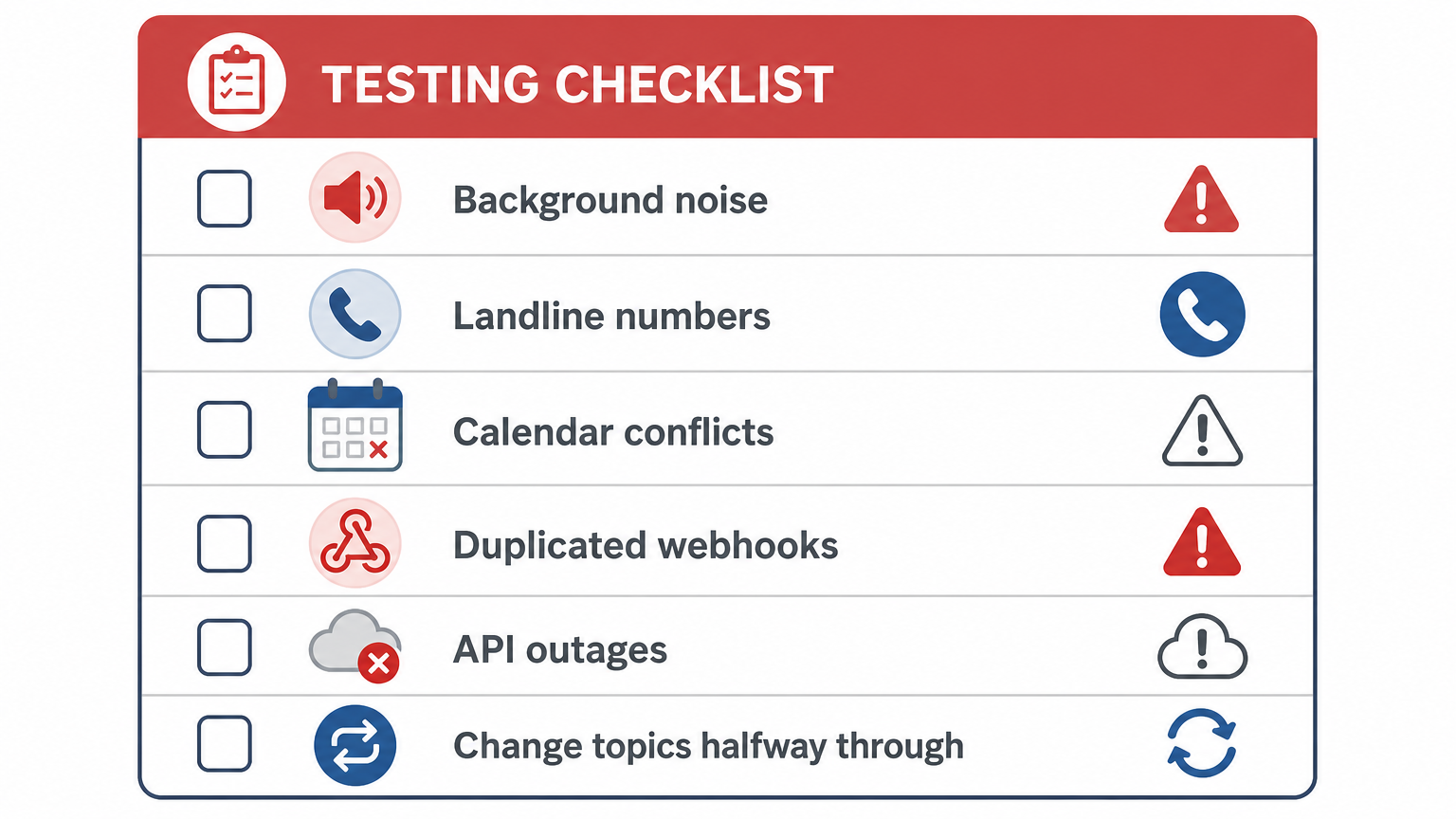 A demonstration usually shows a cooperative customer giving clear answers and selecting an available appointment. Production traffic includes background noise, spelling mistakes, landline numbers that cannot receive texts, calendar conflicts, duplicated webhooks, API outages, and people who change topics halfway through a conversation.
Test what happens if an appointment disappears between being offered and confirmed. The agent should apologize, refresh availability, and provide new options rather than silently double-booking. Test a customer replying to an old message after the lead has been closed, as well as two family members using the same phone number for separate properties.
Monitoring should expose operational outcomes, not merely whether servers are online. Track time to meaningful first response, qualification completion, booking completion, human handoff rate, duplicate creation, integration failures, and opt-out handling. Review these metrics by channel and opening-hours status so that a strong daytime result does not hide a broken weekend workflow.
Roll out in stages. Begin with one channel, a limited set of lead categories, and conservative permissions. For example, the first version might text back missed callers and prepare callback summaries without writing appointments. Once the team trusts the qualification and CRM updates, you can enable direct booking for routine jobs while preserving human review for everything else.
A custom build is most appropriate when your routing, scheduling, privacy, or workflow requirements do not fit a packaged tool. If you need to hire AI developers for that work, bring them a map of your current lead journey rather than a request for “an AI chatbot.” Include each channel, required question, system of record, escalation owner, and action the agent is allowed to take.
Turning Faster Response Into a Practical Build
Start with ten to twenty recent leads and reconstruct what happened. Record when each enquiry arrived, when a meaningful reply was sent, how many systems were touched, which questions employees asked, and where the process stalled. This gives you a baseline without relying on a misleading company-wide average.
Next, choose one expensive delay. Missed calls outside office hours are often a manageable starting point because the trigger is clear and the first automated action can be limited to text-back and qualification. Define the emergency branches, CRM fields, booking permissions, and human escalation queue before selecting models or designing conversational language.
A useful first release does not need to automate every lead. It needs to respond reliably, avoid unsafe promises, and leave clean records in the tools your team already uses. Set a specific initial target, such as ensuring every eligible missed call receives a meaningful text response within one minute, then inspect the exceptions that prevent the system from meeting it.
Frequently Asked Questions
Does an AI agent need to answer every phone call directly?
No. Many businesses start with missed-call text-back because it is easier to control and less disruptive than replacing live call handling. Voice automation can be added for after-hours coverage or specific call types once routing and escalation rules are proven.
Can the agent book jobs without giving it full calendar access?
Yes. A scheduling service can expose only valid appointment options and accept tightly controlled booking actions. The agent does not need permission to edit unrelated events, technician leave, or administrative calendar settings.
What happens when a customer does not want to talk to AI?
Provide a clear route to a person, such as requesting a callback or pressing a key during a voice interaction. The system should record that preference and avoid repeatedly forcing the customer through the same automated questions.
Should we replace our CRM before adding AI follow-up?
Usually not. Connect the agent to the CRM and scheduling tools employees already use, then fix specific data-quality problems uncovered during integration. Replacing the CRM at the same time adds migration, retraining, and process risk to a project that should initially focus on response time.
How long should an automated qualification conversation be?
Ask only what is necessary to route, book, or safely escalate the enquiry. For a routine local service job, that may be service type, postcode, urgency, and preferred time. If completion drops after a particular question, review whether the information can be collected after booking instead.
What should we measure after launch?
Track meaningful first-response time, completed qualifications, successful bookings, human handoffs, duplicates, and failed CRM or calendar writes. Pay particular attention to the percentage of eligible missed calls that receive a useful response within your chosen target, such as 60 seconds, rather than celebrating an instant but unhelpful acknowledgement.
Ready to build the software behind your product?
Book a discovery call